Ask for a Follow Before Sending a Link on Instagram
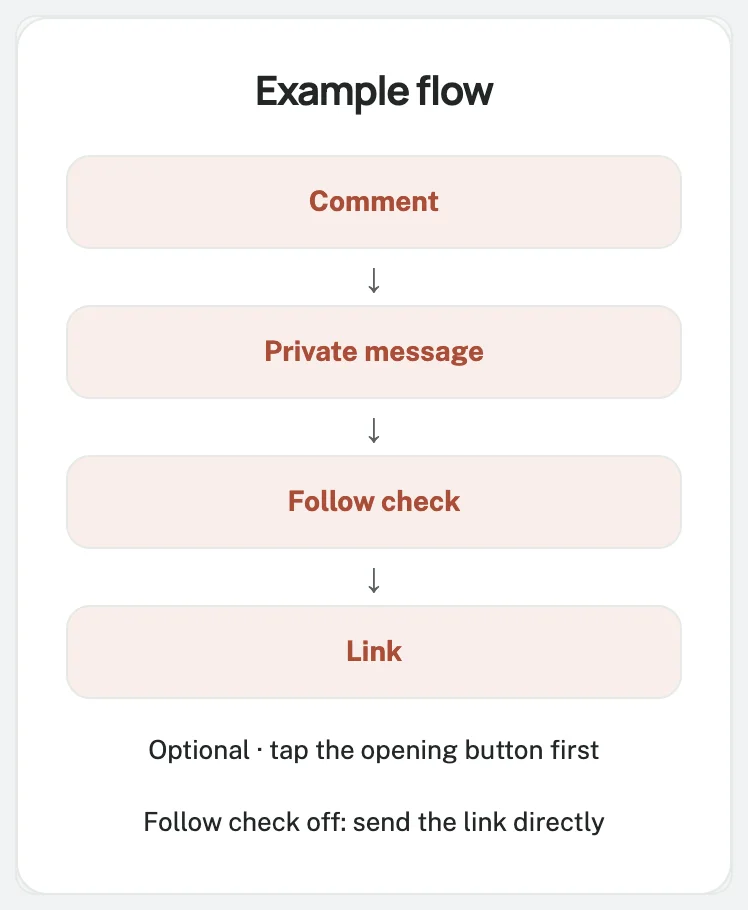
Want to check a follow before sending a link?
Turn on Only for followers.
The person must tap the opening button before the check runs.
The flow starts with a keyword comment and messaging interaction.
Following alone does not trigger a DM or resume a waiting flow.
Decide whether to require a follow
Direct delivery is the default.
Someone asks for your guide and receives its link in the private reply.
A strict follow requirement holds the resource until following is confirmed.
State that condition in the caption so people know what to expect.
Each extra tap is another step to complete.
Under More options, the builder warns that requiring engagement before access to promised content carries higher policy risk.
Review this note before choosing strict mode.
Send, then invite to follow, under More options → Follow gate, delivers the resource regardless of status, then can invite a follow.
Begin with a working comment-to-DM rule
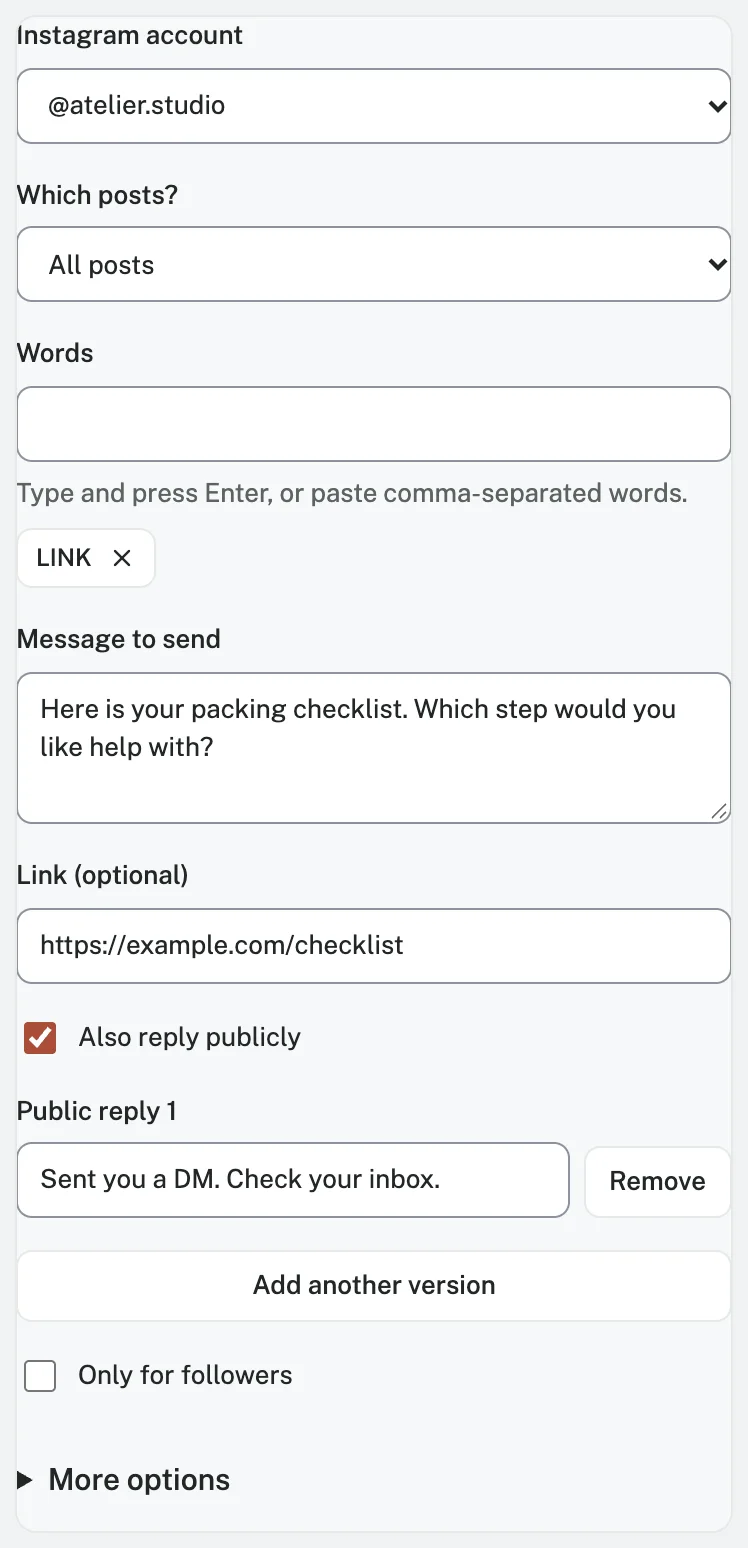
Follow the Instagram comment-to-DM setup guide.
Connect a Business or Creator account through Instagram Login, select the post, enter LINK under Words, and prepare the message.
Dayrect uses the official Instagram API with no password sharing.
Dayrect runs on a 23K-follower music page where 900+ people got an automatic DM in two weeks.
Test direct delivery before adding the check.
Keep the same keyword, post, and destination while changing the follow setting.
For a photography checklist, a conditional caption could say:
Follow the page and comment LINK to request the photography checklist. We will check the follow before sending the link.
Keep customer support and essential purchase information available without a follow requirement.
Steps
1 Enable the check and edit its wording
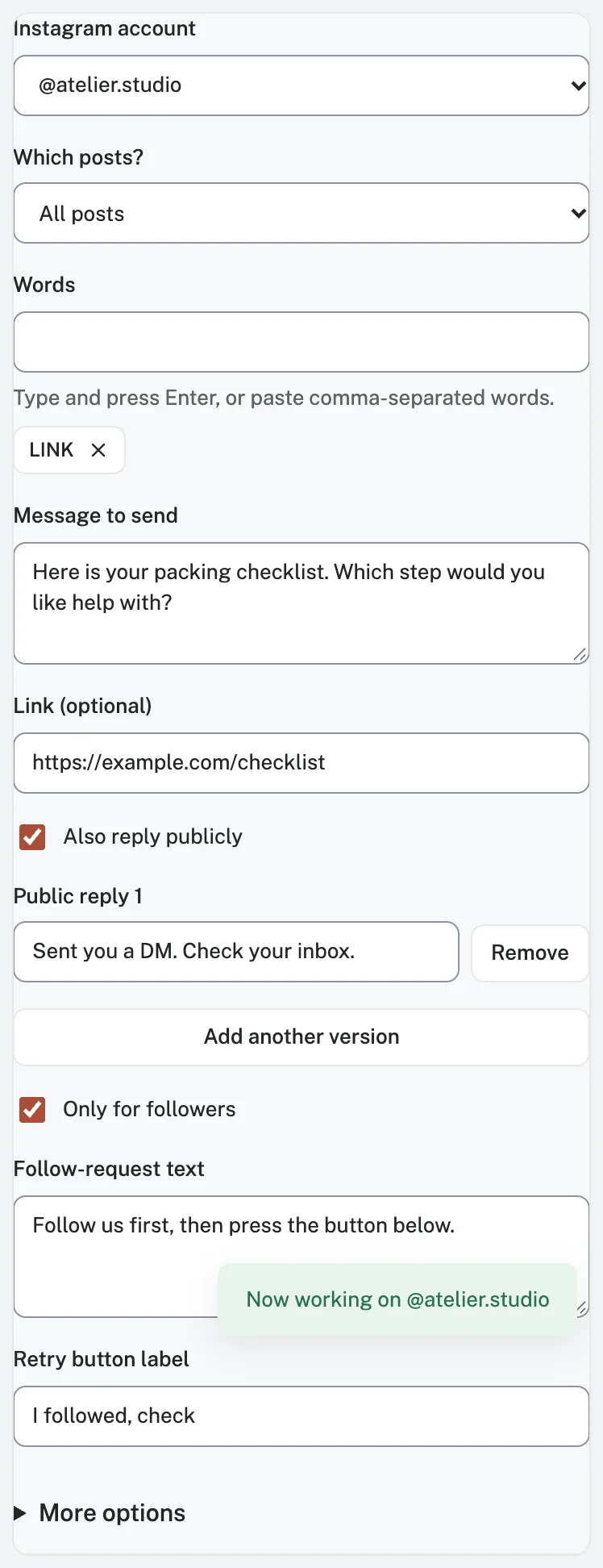
In Comment → DM, select Only for followers for strict mode.
Edit Follow-request text and Retry button label.
Keep the default label, I followed, check, for these examples.
Use neutral follow-request text because the check may be unavailable:
We could not confirm your follow yet. Please follow the page if you have not already, then tap “I followed, check.” If you already follow and it still fails, reply here for help.
The simple strict flow uses this text for both confirmed non-followers and unavailable status.
2 Review the opening message
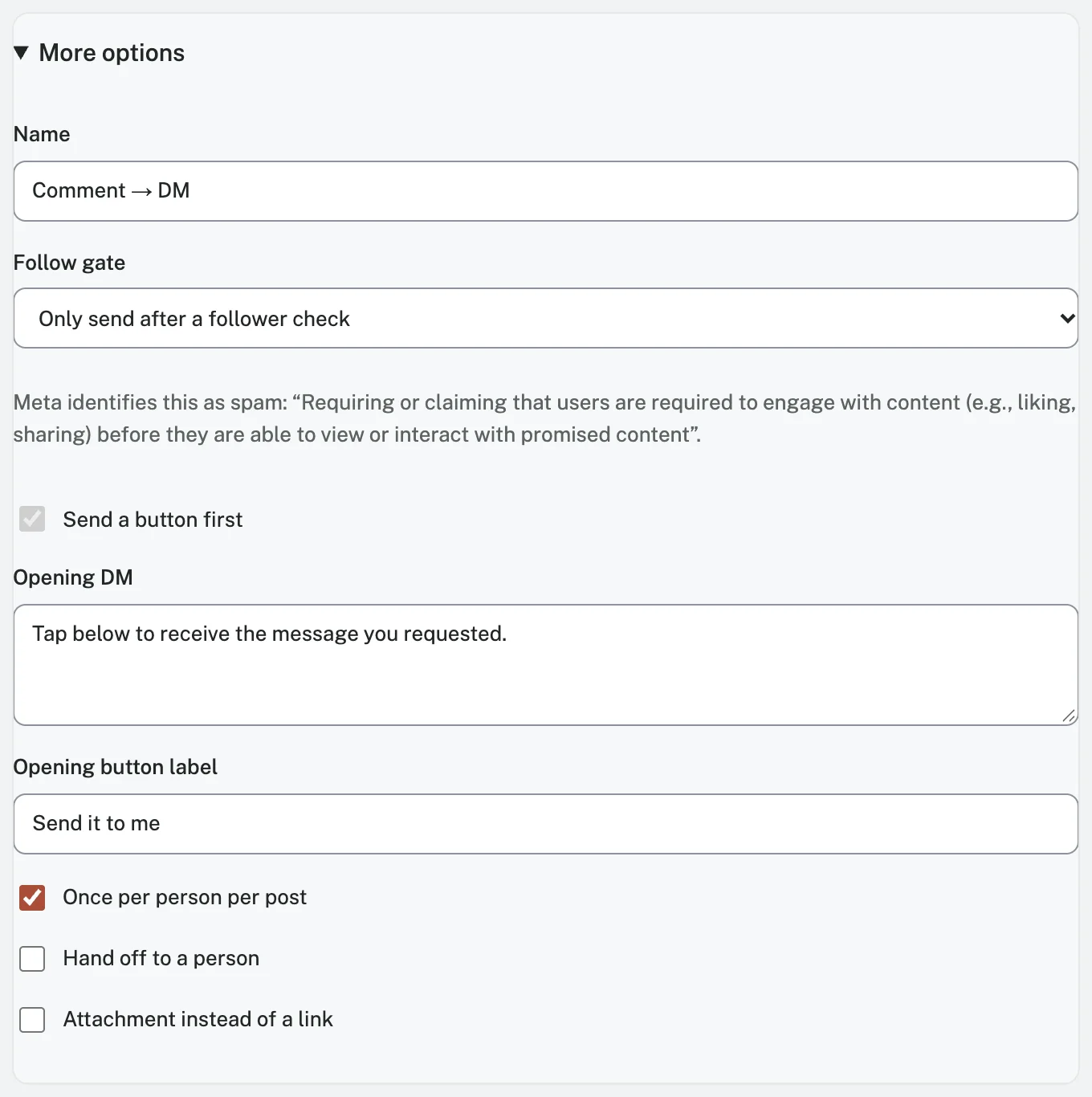
A comment alone is not enough for this flow's profile check.
With the follow setting enabled, Send a button first is required.
Under More options, review Opening DM and Opening button label.
The default opening button says Send it to me.
Tapping supplies the inbound interaction; the follower check then determines whether to release the link.
Keep the resource URL in Message to send or Link (optional) for delivery after confirmation.
Leave it out of the opening.
Explain what the opening button does.
An existing follower still needs to tap it before the check.
Keep the link out of public reply variants too.
This keeps the caption, opening, and delivery consistent with the promise.
3 Understand each result
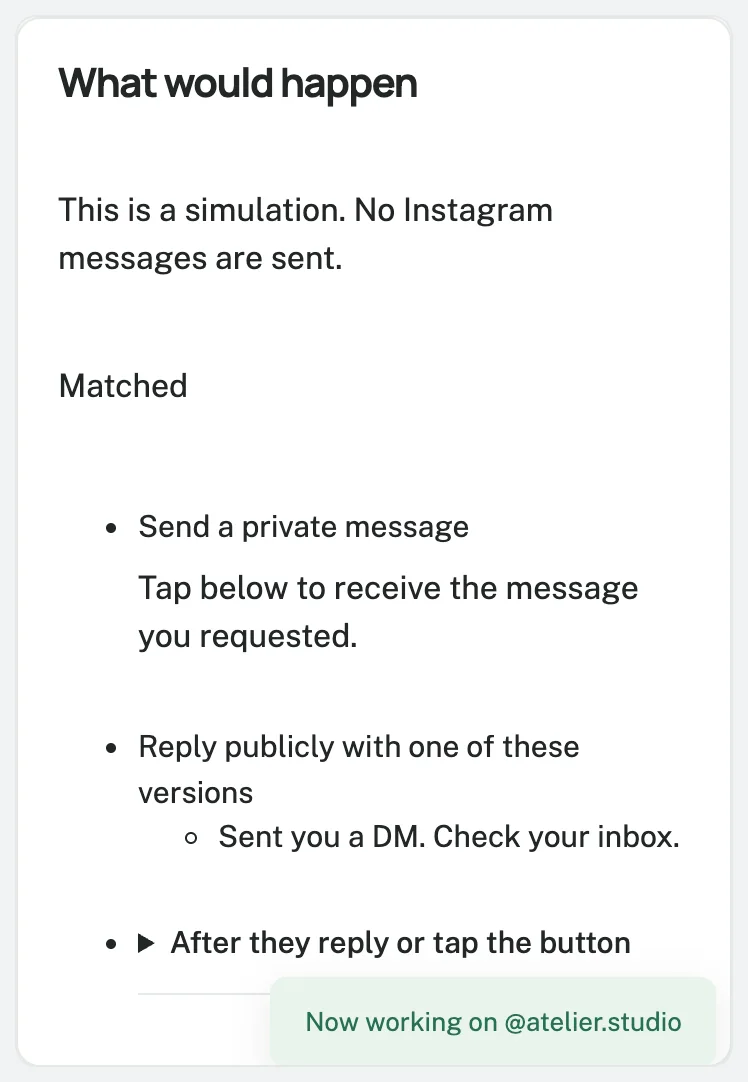
Here is how the default flow handles each result.
| Situation | What the flow does |
|---|---|
| Follow check off | A simple direct text-and-link rule can send the resource in its private reply. |
| Follow confirmed after the opening tap | Sends the configured resource message. |
| Non-follower confirmed | Holds the link and presents the follow request with its retry button. |
| Status unavailable | Uses the same holding and retry path as a non-follower; unavailable does not mean unfollowed. |
| Person follows, then taps I followed, check | Requests a fresh status check; releases the resource if following is confirmed. |
| Person leaves without tapping | The flow waits; following alone does not advance it. |
The retry button requests fresh status rather than reusing the cached result.
Instagram may still return unavailable status.
After three follow prompts, the default strict flow hands unresolved conversations to a person.
Have someone review those handoffs.
Test the branches before promoting the post
Inspect the simulated actions with Test with a sample.
It sends no Instagram messages.
Review the rule and choose Save and turn on when ready.
Run recipient-side tests with controlled accounts:
- An existing follower comments LINK, receives the opening, taps Send it to me, and checks the delivered resource.
- A non-follower comments LINK and taps the opening. Confirm that the follow request appears without the resource URL.
- That person follows the page, returns to the conversation, and taps I followed, check. Confirm the subsequent status and link delivery.
- Check that an unrelated comment does not trigger this keyword rule and that a repeat comment respects Once per person per post.
Note: Inspect the unknown-status branch in the advanced editor or a controlled simulation.
Record unavailable checks separately from confirmed non-followers.
Check the messages and destination on a phone.
Confirm both the status result and delivery.
Automated continuation pauses while a human owns the conversation.
Help someone whose link is stuck
Find the last completed step: opening received, button tapped, correct page followed, then retry pressed.
Check the connection and activity for send failures or unavailable status.
Ask: “Please tell us which resource you requested so we can help.” Use the existing conversation; repeat protection can prevent another comment from restarting the flow.
Find wording in the Comment LINK message template and template library.
Keep public acknowledgements neutral until delivery is confirmed.
The Free plan includes the follow-check capability, within its 1,000 monthly active contacts, five active automations, and 100 AI actions.
These contact limits are not message counts.
Check pricing, then start free and explore the follow-check flow.
Frequently asked questions
Must I require a follow?
No.
Leave Only for followers and Send a button first off for direct text-and-link delivery.
Check existing rules: an optional opening may remain enabled.
Can a non-follower receive the first message?
Yes.
An eligible comment can receive the opening before following is confirmed, subject to Instagram's delivery conditions.
Check message requests and the inbox.
What if someone already follows me?
They still tap the opening button.
When the check confirms following, the resource is sent without asking them to follow again.
Unavailable status can still take them to the neutral retry message.
Does typing DONE check again?
No.
Use I followed, check.
The default flow needs that button action to check again.
Does this guarantee more followers?
No.
People may leave or decline, and checks or delivery may fail.
Measure confirmed follows and useful conversations, rather than button presses.